Quickstart
A two-set fit
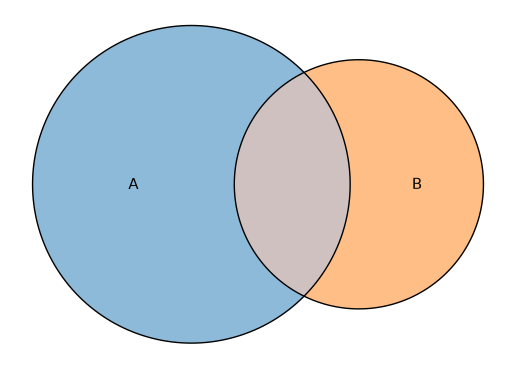
The simplest case: two sets with one overlap.
import eunoia as eu

fit = eu.euler({"A": 10, "B": 5, "A&B": 3})
print(fit)
EulerFit (2 circles, diag_error=3.777e-13, stress=4.838e-25, loss=1.124e-24)
         original      fitted    residual regionError
  A            10          10  -4.597e-12   3.777e-13
  B             5           5  -6.758e-12   5.895e-14
  A&B           3           3  -9.156e-12   3.188e-13
fit.plot();
Inclusive input
By default, values are interpreted as exclusive per-region areas. If your
numbers are total set sizes that include overlaps, pass input="inclusive" and
the Eunoia core converts internally:
fit = eu.euler({"A": 13, "B": 8, "A&B": 3}, input="inclusive")
fit.original_values, fit.fitted_values
({'A': 13.0, 'B': 8.0, 'A&B': 3.0},
 {'A': 13.000000000013753, 'B': 8.000000000015914, 'A&B': 3.0000000000091562})
Membership lists
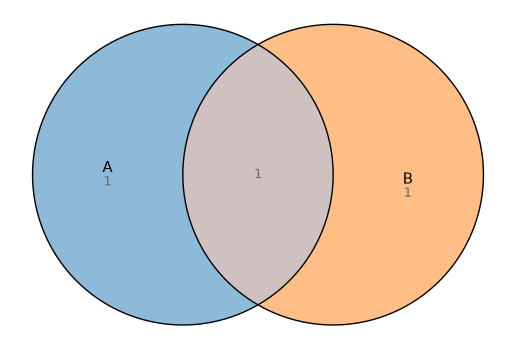
Instead of region areas, you can pass each set its members. Every element is counted into the region of the sets it belongs to, giving exclusive per-region counts:
fit = eu.euler(
    {
        "A": ["x", "y", "z"],
        "B": ["y", "z", "w"],
        "C": ["z", "w", "q"],
    }
)
fit.original_values
{'A': 1.0, 'A&B&C': 1.0, 'A&B': 1.0, 'B&C': 1.0, 'C': 1.0}
Elements are deduplicated within a set and stringified, so sets, tuples, and
non-string labels all work. venn() accepts the same shape (it only needs the
set names):
eu.venn({"A": ["x", "y"], "B": ["y", "z"]}).plot();
Member labels
When the fit knows who is in each region, plot(members=True) draws the member
names in place of (or alongside) the counts. This works for membership-list
input automatically, and for array or DataFrame input when you pass ids= (see
below). Long lists that do not fit inside a region are pushed outside with a
leader line; cap them with members={"max": n}, which lists the first n names
and adds a "+N more" line:
fit = eu.euler(
    {
        "A": ["ada", "alan", "grace"],
        "B": ["alan", "grace", "linus"],
    }
)
fit.plot(members=True, quantities=False);
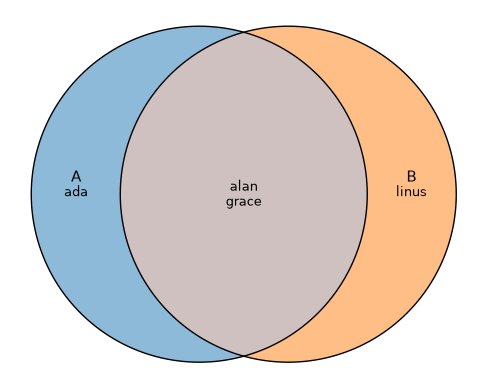
The names are available on the fit as fit.members (a mapping from canonical
region key to the sorted member names), so you can use them without plotting.
DataFrames
A pandas or polars DataFrame (anything narwhals
supports) is read as a membership matrix: each column is a set, each row an
observation, and a truthy cell means that observation belongs to the set.
Columns must be boolean or 0/1 numeric:
import pandas as pd

df = pd.DataFrame(
    {
        "A": [1, 1, 0, 1, 0],
        "B": [0, 1, 1, 1, 0],
        "C": [0, 0, 1, 1, 1],
    }
)
eu.euler(df).original_values
{'C': 1.0, 'B&C': 1.0, 'A': 1.0, 'A&B': 1.0, 'A&B&C': 1.0}
Rows that belong to no set are dropped, and venn(df) takes the column names as
the set names. The same works for polars frames.
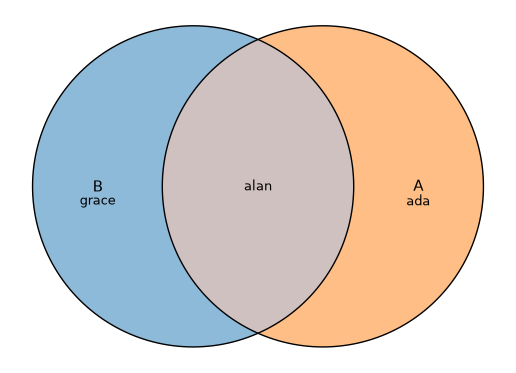
To keep member labels (see above) for a frame, pass ids= naming a column of
per-row identifiers; that column is read as the members and excluded from the
sets:
df = pd.DataFrame(
    {
        "A": [1, 1, 0],
        "B": [0, 1, 1],
        "name": ["ada", "alan", "grace"],
    }
)
eu.euler(df, ids="name").plot(members=True);
NumPy arrays
A plain numpy boolean array is read as a membership matrix too (the matrix idiom
from eulerr): a 2D (n_observations, n_sets) array, or a 1D array for a single
set. An array carries no column names, so pass them with names= (otherwise
sets are named A, B, …):
import numpy as np

rng = np.random.default_rng(0)
arr = rng.random((100, 3)) < 0.4  # 3 boolean columns
eu.euler(arr, names=["A", "B", "C"]).original_values
{'C': 17.0,
 'B': 13.0,
 'B&C': 12.0,
 'A': 14.0,
 'A&C': 10.0,
 'A&B': 4.0,
 'A&B&C': 2.0}
Values may also be 0/1 numeric, and NaN cells count as non-members. This
scales to many columns: a 13-column boolean matrix is too many sets for a true
Venn diagram, but eu.euler(arr, shape="circle") still fits an
area-proportional Euler diagram.
Arrays carry no row labels, so to keep member labels pass ids= a sequence with
one identifier per row: eu.euler(arr, names=["A", "B", "C"], ids=row_labels).
Three sets with ellipses
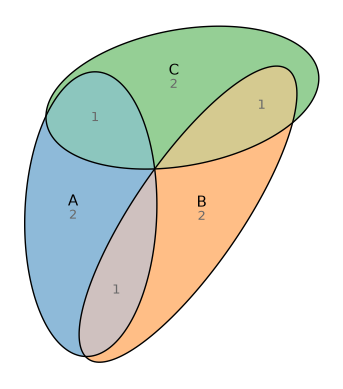
Ellipses are more flexible than circles and can fit many three-set arrangements exactly:
fit = eu.euler(
    {"A": 2, "B": 2, "C": 2, "A&B": 1, "A&C": 1, "B&C": 1},
    shape="ellipse",
)
print(f"diag_error = {fit.diag_error:.3g}")
fit.plot(quantities="fitted");
diag_error = 1.87e-12
Custom styling
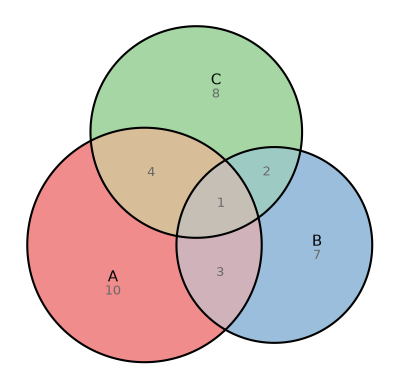
fit = eu.euler({"A": 10, "B": 7, "C": 8, "A&B": 3, "A&C": 4, "B&C": 2, "A&B&C": 1})
fit.plot(
    colors=["#e41a1c", "#377eb8", "#4daf4a"],
    quantities=True,
    edges={"linewidth": 1.5},
);
Math text in labels
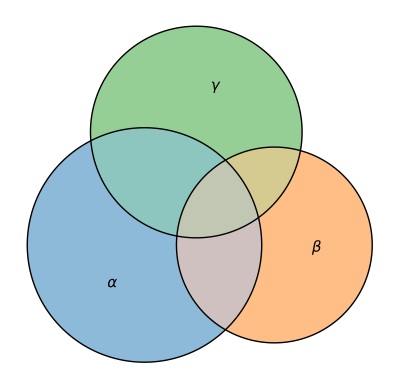
Set names are drawn as matplotlib text, so anything between $…$ is rendered
with its mathtext
engine. Use Greek letters, subscripts, or full TeX as set names and they carry
through to the labels and legend:
fit = eu.euler(
    {
        r"$\alpha$": 10,
        r"$\beta$": 7,
        r"$\gamma$": 8,
        r"$\alpha$&$\beta$": 3,
        r"$\alpha$&$\gamma$": 4,
        r"$\beta$&$\gamma$": 2,
        r"$\alpha$&$\beta$&$\gamma$": 1,
    }
)
fit.plot();
Reproducibility
Pass a seed to fix the optimizer’s RNG:
fit_a = eu.euler({"A": 10, "B": 5, "A&B": 3}, seed=42)
fit_b = eu.euler({"A": 10, "B": 5, "A&B": 3}, seed=42)
fit_a.diag_error == fit_b.diag_error
True